SMS Opt-In Consent Flow
How a stakeholder consents to receive text messages from BluBla.
https://confirm.blubla.app/?token=dem0dem0dem0dem0dem0dem0dem0dem0
It never expires and is never consumed, so you can open and press it as many times as you like.
BluBla is an iOS accountability app operated by Gradaran, LLC (support: support@blubla.app). Account holders set a daily time limit on a specific app and may nominate one friend — a "stakeholder" — to be notified about how they do against that limit. BluBla's automated (A2P) SMS messages are sent only to stakeholders, and only after that stakeholder has personally opted in on the web page described below. BluBla's own account holders never receive SMS; they receive in-app push notifications. This page documents exactly how a stakeholder opts in, so the consent experience can be independently verified — including a public link a reviewer can visit directly.
Step 1 — The user chooses one stakeholder in the app
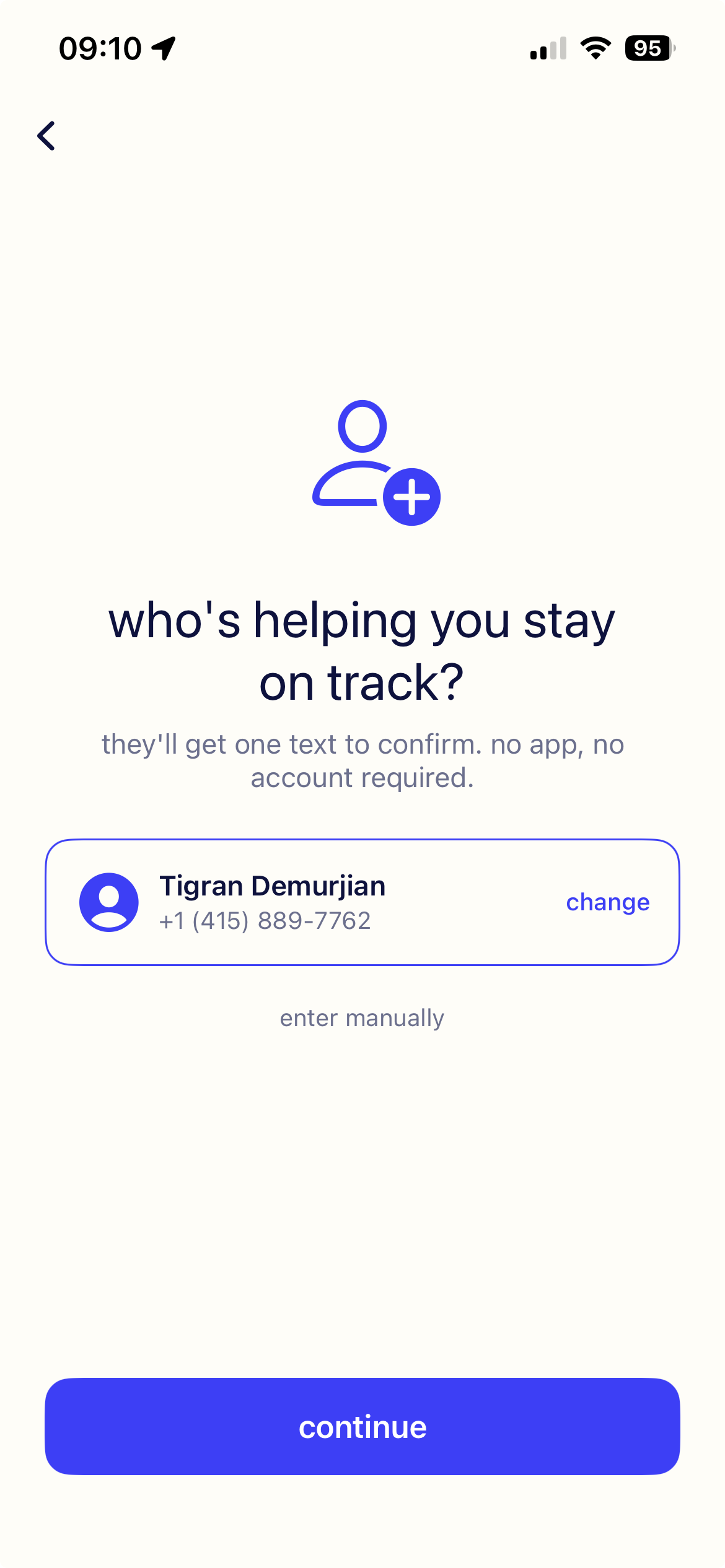
Inside the BluBla app, the account holder picks a single person to be their accountability stakeholder and provides that person's mobile number — from their contacts or typed in manually. The screen states plainly that the chosen person "will get one text to confirm", so the account holder knows up front that nothing is sent until the stakeholder agrees. This is the point at which the mobile number enters the system, and it is captured by the account holder, for their own chosen friend:
The confirmation invitation itself is then sent as an ordinary person-to-person text from the account holder's own phone, using the iOS Messages composer. It is not sent from BluBla's number and is not an automated/A2P message — the account holder sees and sends it themselves. It contains a personal note and the confirmation link, for example:
Because this message originates from the account holder's personal device and number, it is outside the scope of BluBla's A2P messaging. It is documented here only for completeness.
Step 2 — Stakeholder opts in on the web
Tapping the link opens confirm.blubla.app, where the stakeholder sees who invited them and a full disclosure of the messages they would receive. No opt-in is recorded on page load. The stakeholder must press an explicit "Yes, text me" button to consent. The on-page disclosure reads:
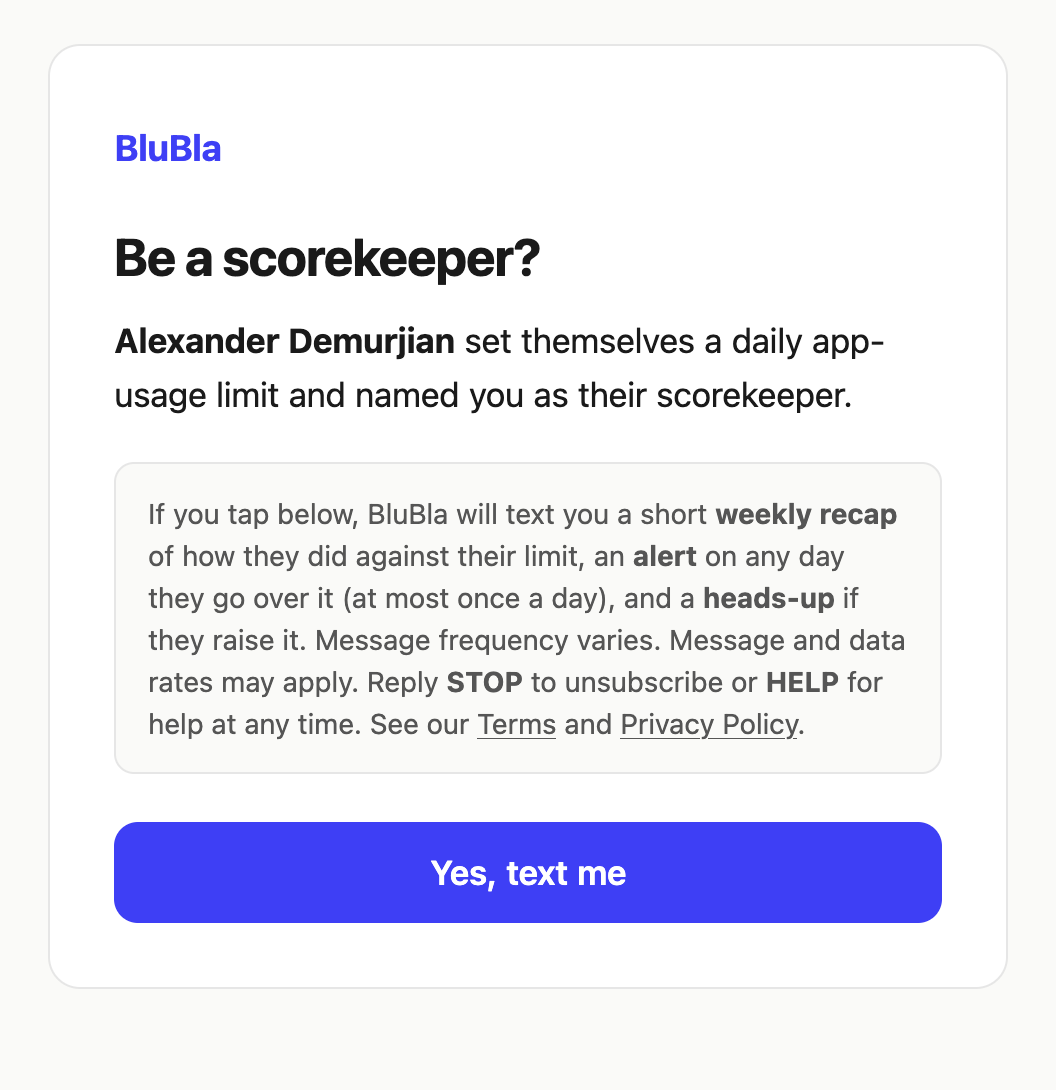
https://confirm.blubla.app/?token=dem0dem0dem0dem0dem0dem0dem0dem0
This demo invite never expires and is never consumed, so it always lands on the live opt-in — you can open and press it as many times as you like.
Only after this button press does BluBla begin sending automated SMS to the stakeholder. If the stakeholder never opens the link or never presses the button, no automated message is ever sent.
What stakeholders receive after opting in
- A weekly recap — a short summary of how the account holder did against their limit that week (at most once per week).
- A daily breach alert — on any day the account holder exceeds their limit (at most once per day).
- A loosen heads-up — if the account holder raises their own limit, their stakeholder gets a notice (only when that happens).
Message frequency
Message frequency varies — typically a weekly recap, plus an alert on any day the limit is exceeded (at most once per day).
Opt-out & help
Reply STOP to any BluBla message to unsubscribe immediately and receive no further texts. Reply HELP, or email support@blubla.app, for assistance.
Costs
Message and data rates may apply per your mobile carrier. BluBla does not charge for SMS.
Mobile numbers and SMS consent data are never shared with third parties or affiliates for marketing or promotional purposes. Terms: blubla.app/terms · Privacy: blubla.app/privacy.